How to Cancel or Retract Friend Requests on Facebook… and Why?

UPDATE!

Now you can cancel your Friend Request simply by going to that person’s page, scrolling down to the very bottom left and clicking on the box that says “CANCEL FRIEND REQUEST”.

Thanks to an anonymous commenter below for the update and congrats to Facebook for finally getting smart on this feature. Now, if only if it could move on a whole bunch of other bad features it has!

Why would you care to cancel Facebook Friend Requests?

Because after you send a friend request, they can check out all your profile you would share with your friends. That’s to help verify who you are if they don’t know you, or let them decide if they want to associate with you based on what you’ve done on Facebook… or told of what you’ve done in life. It’s a bit of a spy privilege they have to be able to see your profile. Supposedly this only holds true for 30 days from when you send your friend request, but 30 days is plenty of time to browse through even the most active Facebook user to see enough of anybody and make some judgment calls on them.

If you’ve used Facebook enough, you have probably sent someone a friend request which they did not accept.

Or maybe you’ve sent it and then changed your mind.

But how do you “undo” it, if you will? How can you cancel that friend request? There is no “cancel”, “undo” or “retract” button.

No, there isn’t.

But what you can do is this.

Search the person in the Facebook search bar. As you’ve sent a friend request, Facebook should be smart enough to list that person high on your search list to make it easy to find. So even if it’s a John something or rather, Facebook should include the John you want amongst all the Johns you know.

Um, that didn’t sound very right, but you get the idea.

Select the person you want to view his/her profile.

Look down the left hand side of their profile that shows up and Click on Report/Block this Person.

From the pop-up menu, just Block them. You don’t need to report them. You might be tempted to if your ego is bruised by them not accepting your Friend Request, but play nice.

Now, you can leave them blocked. But you might also want to leave that window open in case they might like to maybe send a Friend Request to you… which you might want to accept? 🙂

However, I would recommend you Unblock them, by removing them off your Blocked List, to return things to the way they were before you sent that Friend Request you just retracted.

If you want to do this, then Click on Account in the upper right hand corner.

Choose Privacy Settings.

Click on Edit your lists under Block Lists (at middle bottom of your screen when this was written).

Click Unblock beside the name of the person you just blocked.

DONE!

And the world is beautiful once more. 🙂

If you want to ignore a Friend Request “nicely”…

What happens when someone sends you a Friend Request which you don’t want to accept but which it can be a bit awkward to ignore?

Well, there isn’t a completely effective way, but maybe try this “plea ignorance” or “blame technology” attempt before smacking reality into someone if they don’t get the hint.

Follow the same “call up their profile, then block and unblock routine” of the person whose friend request you want to ignore.

What that does is remove that Friend Request they put through. It’ll hint it to them a bit that the request disappeared, or it’ll make them try again, which will tell you they didn’t get the hint and that you need to either talk to them and smack a little reality into them, or Block them!

In the meanwhile, though, you can “play ignorant” if they ask you about it in person to say “what friend request”?

When they check your profile, they’ll see the “Add as a Friend” button present, suggesting maybe that request didn’t go through. Or whatever. One great thing about technology is that you can use it to blame all kinds of things

By the way, if someone ever asks you “did you accept my Facebook friend request?”, you might want to take that as a little sign of desperation for something or rather. Maybe they don’t want you, but just to up their Facebook friends tally. However, it seems a little desperate to me and I’d never ask anybody that.

Alas, now that I’ve shared this, I’ve lost a couple of more Facebook etiquette secrets… but it’s all good for humanity. 🙂

Other Facebook issue posts on my site:

The Prejudices and Privacy Perils of Facebook Quizzes

How to Get Rid of Your Facebook Past

25 Things For Facebook You Can’t Steal My ID With

25 Things You Gave on Facebook to Help Get Your ID Stolen

Una Guía de Netiqueta Práctica para Facebook

Share/Bookmark

Flesch-Kincaid Grade Reading Level: 5.7
(which is below Facebook policy’s age for having a Facebook account at 13 years old)

Blue Sky, a Feel Good Song by Jason Collett

I was out at the movies recently and ending up hearing a great song, Blue Sky by Canadian Indie rocker Jason Collett. The video below is from a fan, not official video.

I heard this song from a bit of a strange feature before the films started. It was insinuated to be a movie, like a trailer but not a trailer. The concept and cinematography was quite moving, so it was better than a commercial. The song suited the images well, at least for feel. I’m not going to sit and analyze the lyrics for suitability to a theme. However, at the end, it flashed some text about heart disease being the biggest killer in women today. That really just spoiled the whole thing for me because not only did it catch me by surprise, the rest of the content had no relevance to the message. I’m not going to analyze whether that meant it “worked” on me or not. I just thought it was poor “marketing” or “communications”. And to be honest, it flashed the song credits so fast I was intent to catch it the next time I heard it rather than pay attention to the heart disease message.

A little research showed that heart disease message was about Facebook campaign called Love Your Heart. I see the “red dress” is the symbol of the campaign and I “get it” a bit about the red dress in that movie/commercial now. But it was just bad communications, in my opinion, if I had to go research it and didn’t care for whatever it had said on-screen after the thing was over.

Anyhow, I just loved how the whole Blue Sky song felt. Nice and simple, with an ultra-feel good chorus that goes right with the beat and lilt of the song. That’s as far as I’m going to analyze it cause sometimes, it just to go with da flow, ya dig?

Bring on, blue sky, bring on, blue sky!

Maybe they should write a customized version with a chorus of wear a red dress instead of bring on blue sky.

I must have a listen to more of Jason’s music!

.

Jason Collett, from his MySpace site

Blue Sky

You tried to make good
Hiding out in the neighborhood
Getting by and it’s understood
There’s no time like the time right before the flood

You get high to feel your love
It’s alright, so you need the crutch
Step aside, wonder what’s up
You close your eyes
You see you’ve missed so much

Bring on the blue sky
Bring on blue sky
Bring on the blue sky
Bring on blue sky

You can fly in your dreams
Floating by the black and white scenery
Take a drive where lovers leap
Only to arrive dead on your feet

Bring on the blue sky
Bring on blue sky
Bring on the blue sky
Bring on blue sky

Oh, this stiff heart of mine (stiff heart of mine)
If ever there was a time (there was a time)
Only you must leave these things behind

The paint is peeling off
The hood of this old truck
As you drive into the West
Where the eye of God is sinking fast

Bring on the blue sky
Bring on blue sky
Bring on the blue sky
Bring on blue sky

Bring on the blue sky
Bring on blue sky.

.

Share/Bookmark

Flesch-Kincaid Grade Reading Level: 7.0

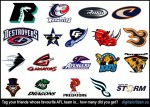
NFL, AFL, CFL Football Fans Facebook Friends Tagging Challenge

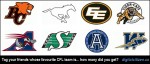
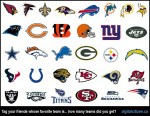
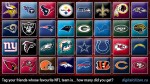
I created these tagging challenges for fans of North American professional football, or people who know lots of those fans. The tagging challenges can be done on Facebook, MySpace, LiveJournal or other platforms where you can tag people on pictures.

The idea is to see how diverse is the group of football fans you know, and how does that compare to your fellow football loving friends. It’s no fun if everybody supported the team you supported, you know!

  • Pick a Facebook tagging meme of your choice based on the leagues below: National Football League (NFL), Canadian Football League (CFL) and Arena Football League (AFL).
  • Tag one person you know whose favourite team is represented by the team logo. It has to be that person’s favourite team as you can’t tag a person twice on the same photo.
  • How many teams can you tag? And how does this compare to your friends who might have done this same challenge?

Here’s how to get these graphics for your tagging fun:

  • Click on a picture below to get it at full size.
  • Right click on that picture and save to your computer.
  • Upload it to your Facebook profile.
  • Tag your friends!

Fancy yourself quite the social sports fan, or this isn’t your sport? Try the same Facebook tagging challenges for:

Please click here for a complete list of over 100 Facebook picture tagging memes on this site with which you can use for fun with your friends.

Enjoy!

Share/Bookmark

Take Dr Helen Fisher’s Why Him/Why Her Personality Test for Love

Helen Fisher

Dr Helen Fisher

I have converted the scientific test from Dr Helen Fisher‘s absolutely fascinating book, Why Him? Why Her? Finding Real Love by Understanding Your Personality Type, into a text format you can use in any place where you can edit text, whether a word processor or Facebook Note. This very scientific test will give you a lot of insight into the nature of your personality, who you fall for and why, and you can decide whether that’s what you’re looking for because wanting and doing aren’t necessarily the same thing. While designed to be used for singles looking for love, I’m sure it would be just as interesting for couples to do it rather than just singles. Dr Fisher has tested outcomes against existing couples to verify the theory. I would bet the outcomes couples get would make for an interesting discussion. That’s discussion, not argument!

To get that insight, you’ll need to do Dr Fisher’s test first, then click here to get an interpretation of results. This test is also the core test used on the very successful match-making site, Chemistry.com, that has been the buzz of that scene for a few years now with over 7 million people tested.

Continue reading

Transformers G1 and Movie Facebook Friends Tagging Meme Posters

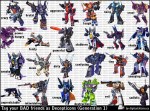
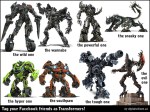
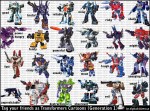
At the bottom are four Facebook friends tagging memes of the Transformers.

The top one is from the movie Revenge of the Fallen, while the others are from the old so-called Transformers G1 (Generation 1) cartoons. I grew up with the G1 set, but that is not why I like it more. There is just way too much detail in the new robots. There aren’t easy faces to recognize and all their parts are so detailed it looks like one good punch and the whole robot would fall apart.

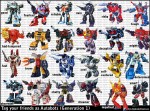
The middle one is of G1 Transformers, Autobots and Decepticons.

The third one is of G1 Autobots.

The bottom one is of G1 Decepticons, to tag your BAD friends with.

The graphics used for the G1 tagging poster is from Botch’s Transformers Box Art Archive, probably the greatest collection of Transformers cartoons out there! Wow! I can spend days on that site! The detail and completeness of the collection is phenomenal, although I’d have added a bit more punch to many of the scans (i.e. a tad more contrast and saturation). However, if you’re thinking of introducing this site to your kids, just be warned that there is at least a smattering of expletives there which I have come across. That’s not so much my criticism as something to take note since I am directing people to the site.

If you would like to use the poster below for tagging your Facebook friends, please:

  • Click on the Transformers poster you want below to get it at full size.
  • Right click on that picture and save to your computer.
  • Upload it to your Facebook profile.
  • Tag your friends.

Please click here for a complete list of over 100 Facebook picture tagging memes on this site with which you can use for fun with your friends.

Please click here to see all the Transformers products (Generation One and Movie) on this site, which include:

  • Avatars, buddy icons and Facebook profile pictures
  • Collectible Trading Cards (print like regular 6″ x 4″ photo)
  • Facebook tagging pictures
  • Posters (18″ x 24″)
  • Wallpapers of many sizes


Movie Transformers

from left to right…

Top row:
Sideswipe (wild), Starscream (wannabe), Megatron (powerful), Ravage (sneaky)

Bottom row:
Skids (hyper), Mudflap (southpaw), Ironhide (tough), Fallen (evil)

Generation One (G1) Cartoon Transformers

from left to right, alternating between Autobots and Decepticons…

Top row:
Prowl (good), Bruticus (brutal), Wheeljack (reliable), Thundercracker (noisy), Sideswipe (risky), Soundwave (shady)

Second row:
Shockwave (power hungry), Bumblebee (feisty), Galvatron (powerful), Jazz (cool), Cyclonus (nasty), Optimus Prime (mighty)

Third row:
Jetfire (fast), Bombshell (crazy), Mirage (sneaky), Predaking (mean), Ultra-magnus (tough), Starscream (annoying)

Bottom row:
Ravage (unpredictable), Metroplex (big), Devastator (destructive), Hound (observant), Megatron (evil), Trailbreaker (smart).

I left out Ironhide and Ratchet, two popular G1 and new movie characters, because their old robot forms were just ugly! If you want to know more about any of these characters, Adam Botch, on his site, has the box scans. Wikipedia even has lots more information and a Google search, sometimes with the word “transformers” added to the name, should get you the page as the first or second search result.

Generation One (G1) Cartoon Autobots

from left to right…

Top row:
Prowl (good), Inferno (fearless), Wheeljack (reliable), Tracks (vain), Sideswipe (risky), Ultra-magnus (tough)

Second row:
Ramhorn (bad-tempered), Bumblebee (feisty), Sludge (slow), Blaster (groovy), Smokescreen (deceptive), Optimus Prime (mighty)

Third row:
Jetfire (fast), Omega Supreme (brave), Mirage (sneaky), Jazz (cool), Sunstreaker (self-centered), Topspin (determined)

Bottom row:
Hound (observant), Metroplex (big), Bluestreak (chatty), Skids (dreamer), Rodimus Prime (impatient), Trailbreaker (smart)

Generation One (G1) Cartoon Decepticons

from left to right…

Top row:
Bombshell (crazy), Bruticus (brutal), Thrust (aggressive), Predaking (tough), Thundercracker (noisy), Blitzwing (cruel)

Second row:
Shockwave (power hungry), Laserbeak (feisty), Galvatron (powerful), Ramjet (stubborn), Cyclonus (nasty), Soundwave (shady)

Third row:
Skywarp (sneaky), Octane (mean), Kickback (dirty), Astrotrain (confusing), Frenzy (tiny), Starscream (annoying)

Bottom row:
Ravage (unpredictable), Menasor (intimidating), Dirge (creepy), Devastator (destructive), Megatron (evil), Shrapnel (sadistic).

Share/Save/Bookmark