Organizing Your TikToks

One thing I borderline hate about social media platforms like Instagram is their inability to let you organize your content. While most probably don’t care about that, being themed accounts or with content they’ll rarely or never care to reference again, being more concerned about Likes and number of Followers in the moment, I am one who creates content I would like to reference again in talking to people to show them or tell thing about things, rather than caring for how many Likes or Followers I have. As a result, I want to be able to find things I have posted quickly, or see similar content all at once, as well as show or direct others to do the same thing without making them scroll though an endless amount of posts eventually. That’s why I have a handful of Instagram accounts themed on different things like origami, fashion, flags, and such, rather than jam them all in one account.

Well, with TikTok, I have found a way to organize my content by any topic I want, using their Collections feature, so I don’t need multiple accounts for differently themed content to keep them organized unless I foresee enough content to dedicate to a separate account. I show you how to organize your TikToks in the way I mentioned in more detail below.
Continue reading

Most Likely To… The Evolution of a Facebook Tagging Meme

Note: Since this posting, I have evolved Facebook picture tagging memes on my own ideas far beyond this concept I saw. My ideas involve real world and life actions rather than just associating ideas. They are listed under the Action memes category, involving what I call Facebook 2.0 tagging memes.

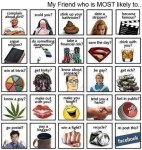
The pictorial Facebook tagging memes that have been going around in many variations seems to have evolved into that common high school year book feature, the Most Likely To… page. I saw one just hours ago, but it was so poorly done (mostly due to almost unreadable small type) I went and created my own, text, picture compilation and all. Here’s how to get it:

  • Click on the picture below to get it at full size.
  • Right click on that picture and save to your computer.
  • Upload it to your Facebook profile.
  • Tag your friends or let them tag themselves.

Please click here for a complete list of over 100 Facebook picture tagging memes on this site with which you can use for fun with your friends.

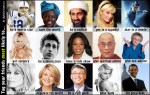
In case you don’t recognize some of the people in my new version, they are as follows, left to right:

  • Top: Peyton Manning, Wangari Matthai, Osama bin Laden, Paris Hilton, Jet Li
  • Middle: Pamela Anderson, Bob Dylan, Oprah Winfrey, the current Dalai Lama, Sue Johannson
  • Bottom: Claudia Schiffer, Martha Stewart, Bill Gates, Anna Nicole Smith, Barack Obama

You can Google these people if you want to know more about who they are, and maybe guess why I’ve put labeled each as such.

Share