Noteflight.com is a music composition webware. It allows you to compose sheet music online in their website, play it and share it as a follow the music style video. Copying and pasting code is about as complicated as it gets for social bookmark style sharing, but the entire package is brilliant. This despite a few shortcomings still present in Beta 3 version.
Isn’t the free world wide web great these days? Everything is going on-line via webware, and “software is so passé” according to CNET and I can’t say I disagree. Their blog has like 10 entries a day on webware for crying out loud! Soon, we’ll only need to get the same scripts on our electronic devices (far more than just computers) and the browser will serve as the means for everything. We will only need the scripts on our electronic devices for when we don’t have a reliable connection and might lose data.
The latest webware I happened upon is sheet music composition software at Noteflight.com. I learned about it from Wesley Fok in his awesome weekly columns called Apps We Love in the Globe & Mail (Canadian paper). Being a bit of an amateur musician, who happened to have composed something like 15 years ago, I not only got to try the site, but I had personal vested interest.
I found the site to be fairly good, though not yet at the quality of expensive software like Finale. You can still do quite a lot with this software. I’m sure there are many things people wish it had, and it will with progressive versions, but this is great for now. The only thing I found on this first go that was disappointing was I could not change tempo in the middle of a piece. They’ll get that sorted out soon enough as it’s just timing and is a digital fix.
But more than just music composition, you can share the file and have multiple people work on it. Then you can share it on blogs and such. They give you some codes and you just throw it in somewhere. It doesn’t quite work for every platform yet. I can’t embed it in my WordPress.com post, for example. However, I can collect it with my VodPod account and widget to the right. I just put those codes from Noteflight.com into the collector, it gives me a page to view it, and I can link the URL to the text like here.
The computer “performance” is less than stellar without the ability for me to indicate tempo changes that were all over this piece. It loses a lot of its life without the appropriate tempo changes. However, I’ll take it just to be able to share it. When the better beta versions come out, I will update it.
As for my étude, it was something I composed to get around stupid and horrible sounding exercises. I was teaching myself piano, cowboy style, you see. Jump in and shoot. Ask questions later. I had no piano training, but I was teaching myself to play the first movement of Beethoven’s Moonlight Sonata (video below) because there were many nights I needed to play it for therapy in the moonlight coming through my bedroom window.
Wow! That video link has over 6.5 million views!!! Talk about timeless! Beethoven gone majorly viral!
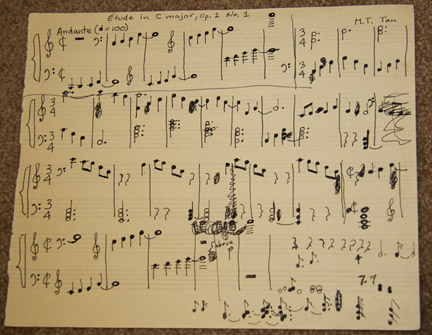
Etude in C, Op. 1 No. 1, by Minh Tan (original manuscript)
Anyway, there were some things about piano playing in that Sonata I was really being challenged by so to get around it, I composed aptly named étude style pieces. I only ever got around to completing one, but I have held on to it like a Beethoven original manuscript. Lo and behold, 15 years later, serendipity, synchronicity and karma had given it a better purpose and meaning in my life. I had it to try and share with the world. It did get a public viewing I never allowed it after all! Life really kicks you know what when you can have skeletons of this sort in your closet!
It’s instances like this, actually, which have happened frequently in my short life thus far that led me to write my six-word memoir as being
Everything done will mean more later
.
Flesch-Kincaid Grade Reading Level: 7.0

 Digital Citizen