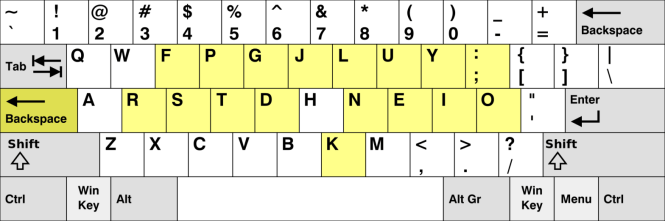
I heard about the Colemak keyboard today from Matt Mullenweg, cofounder of WordPress, via the Tim Ferriss podcast, episode 61. Matt said it was the most efficient keyboard layout, and despite some slightly unconvincing research for speed from efficiency, I have decided to give it a try for reduced long-term ergonomic stress, switching from the QWERTY (that was awkward to type) keyboard. That is, I’m not switching for faster typing speed ultimately. It’s plenty good at about 68 words per minute (wpm). Rather, I’m switching for the decreased reaching I’d have to do with my fingers and hands over the years, at supposedly, about 8-9X less the distance traveled! Additionally, I want to see how it would work out for me rather than just a study since I don’t have an average brain, and also test my middle-aged brain’s ability to learn, unlearn, and relearn.
 This is the first of many tutorials on Microsoft Word and some design aesthetics to go with the technical features being taught. Topics covered this tutorial include:
 Digital Citizen